


HEX, RGB, and HSL are three common ways to write digital colors. HEX is a compact web code, RGB describes red, green, and blue light values, and HSL describes hue, saturation, and lightness. They can describe the same color, but each format uses a different kind of language.
This beginner guide explains what each format means in plain terms. For a practical decision guide about which one to use in CSS or design systems, read HEX vs RGB vs HSL.
🔧 Try it now: Convert between HEX, RGB, and HSL colors instantly with our free Color Code Converter.
What does HEX mean?
HEX (short for hexadecimal) is the most common format for colors on the web. It looks like this:#6C5CE7A 6-digit code starting with #. Each pair of digits represents the Red, Green, and Blue value of the color (in that order).
HEX is compact and easy to copy. It is the default format most design tools show when you select a color. The # symbol simply tells the browser it is a HEX color.

What does RGB mean?
RGB stands for Red, Green, Blue. It describes a color by telling exactly how much red, green, and blue light to mix together:rgb(108, 92, 231)Three numbers from 0 to 255. The first is Red, second is Green, third is Blue. 0 means none of that color; 255 means full intensity.
RGB comes from the world of screens and light. Adding more of each color makes the result brighter, not darker. Pure white is rgb(255, 255, 255) (all lights at full) and pure black is rgb(0, 0, 0) (all lights off).
What does HSL mean?
HSL stands for Hue, Saturation, Lightness. This format was designed to match how humans naturally think about color:hsl(247, 72%, 63%)Three values: Hue (0-360 degrees on a color wheel), Saturation (0-100%, how vivid or gray the color is), Lightness (0-100%, how light or dark the color is). HSL is the easiest format to adjust by hand. Want a lighter version of a color? Increase the last number. Want a more muted tone? Decrease the middle number. It maps directly to the words designers and artists use every day.
Why do digital tools use different color formats?
Can HEX, RGB, and HSL describe the same color?
Here is the same purple shown in all three formats:#6C5CE7 · rgb(108, 92, 231) · hsl(247, 72%, 63%)All three describe exactly the same color, just written differently. Choose whichever format is most convenient for your workflow.
HSL + CSS Custom Properties
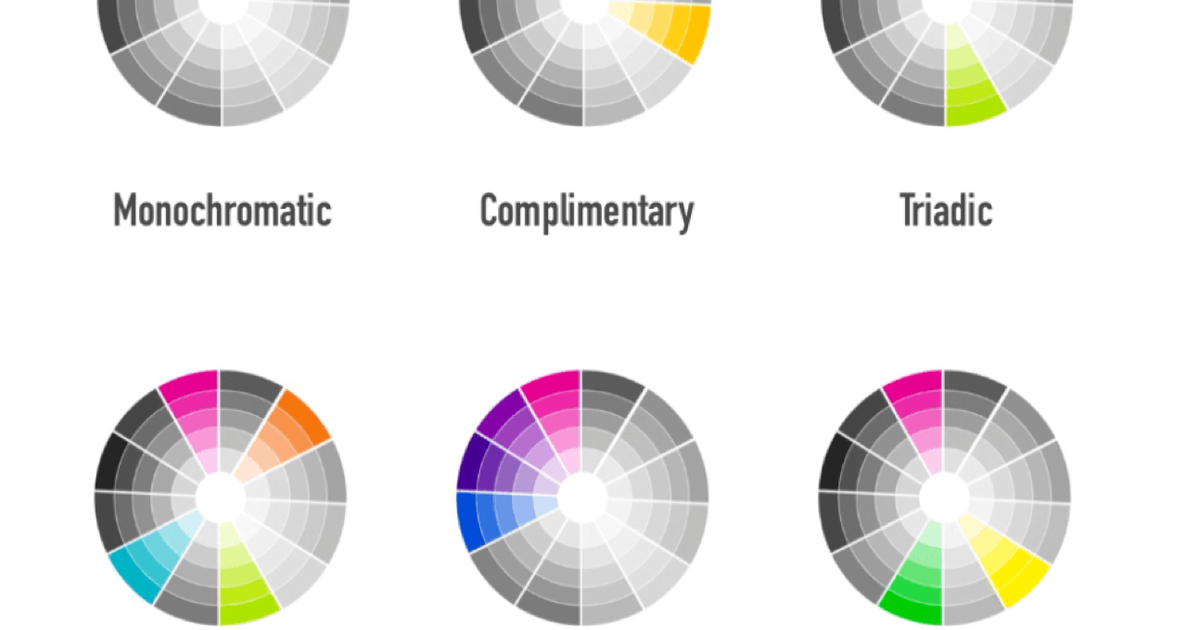
CSS Custom Properties (a.k.a CSS Variables) are the best when it comes to creating multiple themes that can be applied on the fly. They:You can use CSS Variables as a value inside another variable. And you can use CSS Variables in combination with the calc() function. This, combined with hsl(), wields a lot of power when it comes to creating site-wide color themes:
html {
    --hue: 257;
    --complimentary-hue: calc(var(--hue) - 180);
--background: hsl(var(--hue), 26%, 42%); --background-dark: hsl(var(--hue), 26%, 28%); --button-background: hsl(var(--complimentary-hue), 26%, 55%); }
html[data-theme='green'] { --hue: 128; }
html[data-theme='pink'] { --hue: 313; }
Useful Resources
hsl() Codrops CSS Entry